
Documentation
Set up a grid and character
Configure colliders, ground masks, movement references and a foot-level visual before testing click-to-move.
On this page
Goal#
Move a 1×1 unit across a simple floor before adding slopes or stacked surfaces.
Before you begin#
Import the complete package and open its supplied demo. The current Core-bundled sample uses Unity Input System and Resources/TileTickControls; this does not establish a Core dependency for standalone Movement.
Set it up#
- Create a flat floor with an enabled, non-trigger Collider. Put it on a dedicated Ground layer. Use a different layer for obstacles; keep the unit's own collider out of the initial ground/blocked masks.
- Add one active
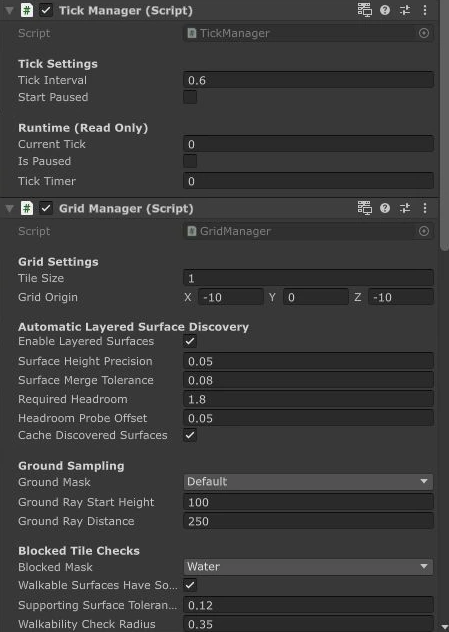
TickManager. Component defaults aretickInterval = 0.6seconds andstartPaused = false. - Add
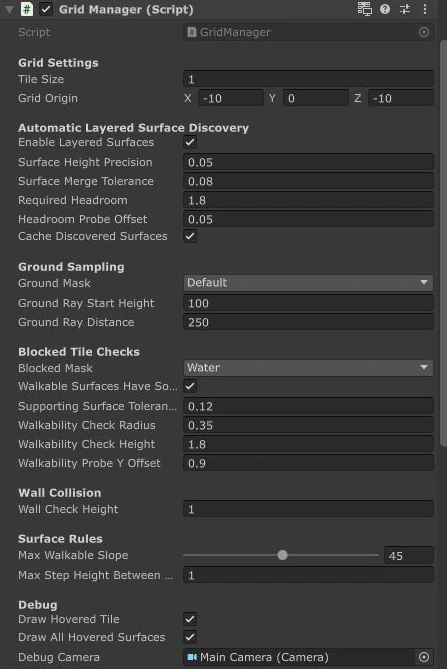
GridManager. Begin with Tile Size (tileSize) 1 and Grid Origin (gridOrigin) zero. Set Ground Mask to include the floor collider's layer and Blocked Mask to include obstacles. - Add an active
TilePathServiceto a scene object. - Create the unit root with
UnitBrain,MovementMotor,CommandQueueandUnitViewMotor. UnitBrain subscribes to ticks; adding MovementMotor alone is insufficient. On MovementMotor, assign the scene TilePathService to Path Service Behaviour (pathServiceBehaviour), which must implementIPathService. - Place the root at foot level. Put geometry on a child. A height-2 Unity capsule with a centered pivot needs a +1 Y visual-child offset at scale 1; adapt this to your own mesh instead of lifting the gameplay root.
- Set
PlayerInputController.playerCameraandcontrolledMotor. Its fallbacks use Camera.main and a parent MovementMotor. Confirm the controls asset exists for your sample's input implementation. - Enter Play and click a reachable floor point. Inspect authoritative CurrentTile as well as the visible model.
What you should see#
The authoritative tile changes on ticks and the visual follows the grounded path. Use the imported demo's UI or MovementMotor.SetRunning(true) to test running; do not assume R/G/H hotkeys exist in every version.
Scale, capsule and ground alignment#
Tile size changes horizontal spacing. It does not rescale every physics probe. Current defaults include requiredHeadroom = 1.8, walkabilityCheckRadius = 0.35, walkabilityCheckHeight = 1.8, walkabilityProbeYOffset = 0.9, slope 45° and step height 0.75 world units. Review each against your actual unit.
If something goes wrong#
A renderer without a collider cannot supply ground. Trigger-only floor colliders are ignored by these ground raycasts. An unassigned path service, paused ticks or missing UnitBrain can stop movement even when a floor looks correct. Follow the diagnostic checklist.
Next steps#
Add paths, running and vertical transitions, then use the component reference for individual APIs.