
Core RPG handbook · Development build / version notes
Core RPG handbook
Cooking: turn a raw ingredient into food
Create a raw ingredient, choose its cooked and burnt results, and use it on a cooking fire.
On this page
Cooking is an item-on-object interaction. The player chooses Use on a raw ingredient, then clicks a CookingStation. Each attempt replaces one raw item with its cooked or burnt result. Successful cooking grants XP; burning does not.
Start with the supplied Raw Shrimp, Shrimp and Burnt Shrimp definitions so you can follow a complete recipe. If you’ve built the gathering campsite, you already have a source of raw fish and a temporary fire.
Find the three parts of the recipe#
Open Tools → Green Cloak Games → TileTick Core RPG → Item Database. Search for these assets under Demo/Scriptables/Loot/Items:
| Asset | Purpose |
|---|---|
CookableItem_Raw_Shrimp | The ingredient and its recipe settings. |
ConsumableItem_Shrimp | The edible result. |
LootItem_Burnt_Shrimp | The failed-roll result. |
Keep these definitions unchanged while learning. For your own recipe, duplicate them into your own content folder and give each copied item a different, stable Item Id. Point your new raw ingredient at your new results.
Create food the player can eat#
To make the cooked result from scratch, use the Project window’s Create → TileTick → Loot → Consumable Item Definition. Give it a Display Name, Icon and Item Id, then set its food behaviour. For a small example, use Heal Amount: 3, Consume On Use: enabled, Timing Type: Food, and Cooldown Ticks: 3.
Consume Even If No Effect decides whether eating at full health still uses the item. Set it to match the behaviour you want. A basic Item Definition can be a cooking output too, but it won’t heal the player.
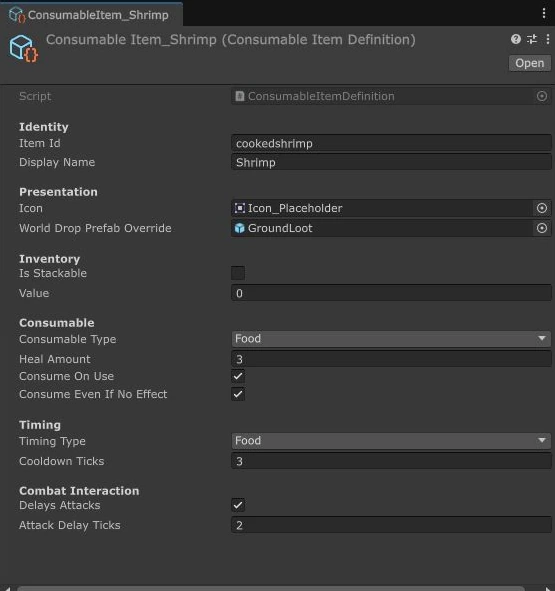
Create the burnt result with Create → TileTick → Loot → Item Definition. It needs its own identity, name, icon and stacking choice. It doesn’t need food behaviour.
Put the recipe on the raw ingredient#
Create the ingredient with Create → TileTick → Loot → Cookable Item Definition, or use Item Database → Create Item → Cookable Item. Assign Cooked Result in the wizard, then inspect the created definition to finish the recipe.
| Inspector field | Raw Shrimp sample | What it means |
|---|---|---|
| Required Cooking Level | 1 | Minimum Cooking level to start. |
| Cooking Xp | 60 | XP for each cooked result; burns grant none. |
| Cooked Item | ConsumableItem_Shrimp | The successful output. |
| Burnt Item | LootItem_Burnt_Shrimp | The failed-roll output. |
| Base Success Chance | 0.75 | 75% at the required level. |
| Bonus Chance Per Level | 0.03 | Adds three percentage points per level above the requirement. |

There is no separate burn-chance field. Burning is the unsuccessful outcome of the cooking roll. The sample’s 75% base chance becomes 90% at Cooking level 6 and reaches the 100% cap at level 10.
A new Cookable Item starts with different defaults: 30 XP and a 0.5 base chance. Choose your own balance explicitly rather than expecting a new definition to match Raw Shrimp.
Set up a cooking target#
The simplest starting point is the supplied fire, or a copy of a station already working in your scene. Keep its collider and interaction components. A local station needs:
- A collider the interaction ray can hit.
WorldObjectInteractablewith a reachable Interaction Point.CookingStationwith Can Cook enabled, on the interactable or one of its parents.

Start with Interaction Range Tiles: 1. A local player must already be in range; the network item command can request an approach and checks the target again on arrival. In multiplayer, use the supplied network fire or a correctly registered network world object so the server can identify the target.
StoveActionHandler doesn’t run a cooking recipe. Adding a menu action named Cook won’t replace the item-on-station setup above.Cook a few ingredients#
- Run your working demo; start a host for the multiplayer scene. Give the player several raw ingredients through a working shop, fishing spot or starter inventory.
- Choose Use on Raw Shrimp, then click the fire or station.
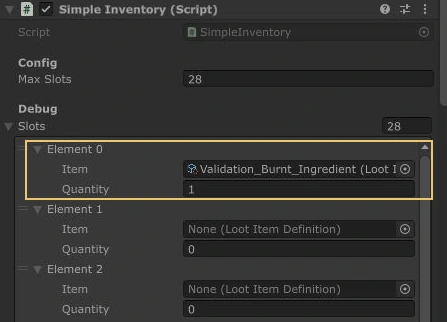
- Watch the inventory. The first result arrives after two simulation ticks; following attempts are three ticks apart.
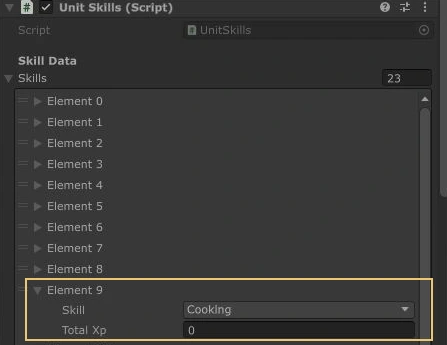
- On success, one raw item becomes cooked food and adds the recipe’s Cooking XP. On a burn, one raw item becomes the burnt result and adds no XP.
- Move or cancel to stop cooking, or let it continue until the raw items run out. Try eating a cooked result to check the food definition separately.
Check item counts and XP as well as animation or messages. A level may not change after one success, even though XP was awarded.
Check your own recipe#
Use a copied test ingredient. Set Base Success Chance to 1 to check the cooked output and XP, then use 0 with Bonus Chance Per Level also 0 to exercise the burn path. Restore the intended values afterward. Also try a player below the required level and a cancellation partway through cooking.
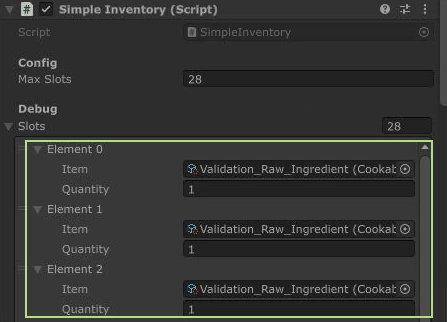
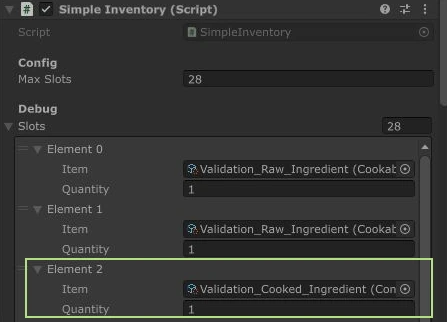
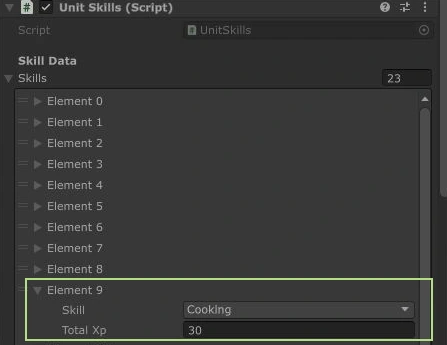
The runtime Inspector examples below use a small test recipe worth 30 XP, rather than the supplied Raw Shrimp recipe’s 60.
If cooking won’t start#
| Symptom | Check |
|---|---|
| Use rejects the ingredient or target. | The ingredient must be CookableItemDefinition. Keep CookingStation on the interactable or a parent, and enable Can Cook. |
| The player cannot click the station. | Check its collider, interaction ray layers and reachable Interaction Point. |
| The action starts, but ingredients don’t change. | Assign both Cooked Item and Burnt Item, leave space for the result and check TickManager. A missing chosen output preserves the raw ingredient. |
| It works locally but fails in multiplayer. | Check the registered target identity and the server player’s inventory slot, item and skill controller. |
| The XP looks wrong. | Read Cooking Xp from the raw ingredient. Burns grant none, and new definitions use 30 by default rather than the sample’s 60. |
| A copied ingredient disappears after loading. | Give it a unique stable Item Id and include its folder in the save registry. |
To supply this recipe from the world, connect a Fishing Spot to the raw ingredient. To let players make their own station, follow Firemaking.